本文深入探讨了Nightwatch.js与
Appium的深度集成架构,详细介绍了
移动端测试的完整解决方案。文章涵盖了从核心架构设计、iOS/Android原生应用测试配置、移动端
Web应用测试最佳实践到云测试平台(BrowserStack)集成的全方位内容。通过分层架构解析、多环境
配置管理和实战示例,为开发者提供了完整的移动端
自动化测试指南。
Appium与Nightwatch.js深度集成架构
Nightwatch.js与Appium的深度集成架构体现了现代移动端测试框架的设计哲学,通过分层架构和模块化设计实现了高效的移动端自动化测试。这种集成不仅仅是简单的API封装,而是从底层传输层到高层命令层的全方位融合。
核心架构层次
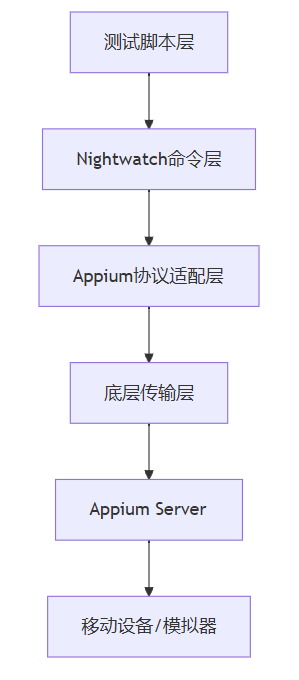
Nightwatch.js的Appium集成采用四层架构设计,每一层都有明确的职责和功能边界:
1. 传输层架构设计
传输层是Nightwatch与Appium通信的基础,采用工厂模式创建不同类型的传输实例:
// 传输工厂模式实现
class TransportFactory {
static createTransport(settings) {
if (settings.webdriver.use_appium) {
return new AppiumServer(settings);
}
// 其他传输类型...
}
}
Appium服务器类继承自基础传输类,提供了移动端特有的配置和能力:
class AppiumServer extends AppiumBaseServer {
get defaultPort() {
return 4723; // Appium默认端口
}
get defaultPathPrefix() {
return '/wd/hub'; // Appium WebDriver端点
}
createSessionOptions(argv) {
// 处理移动设备特有配置
this.extractAppiumOptions();
// 设置设备UDID等移动端特有参数
if (argv && argv.deviceId) {
this.desiredCapabilities['appium:udid'] = argv.deviceId;
}
return super.createSessionOptions(argv);
}
}
2. 能力配置管理
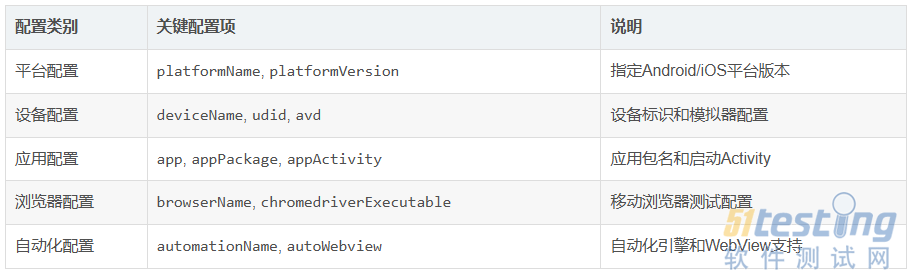
Nightwatch通过统一的能力配置管理系统来处理Appium特有的Desired Capabilities:
3. 移动端特有命令扩展
Nightwatch通过命令包装器模式扩展了移动端特有的操作命令:
// 移动端命令扩展架构
class MobileCommandWrapper {
constructor(nightwatchInstance) {
this.nightwatch = nightwatchInstance;
this.appiumCommands = this.loadAppiumCommands();
}
loadAppiumCommands() {
return {
// 设备操作命令
device: {
shake: this.createDeviceCommand('shake'),
lock: this.createDeviceCommand('lock'),
unlock: this.createDeviceCommand('unlock')
},
// 上下文管理命令
context: {
list: this.createContextCommand('list'),
get: this.createContextCommand('get'),
set: this.createContextCommand('set')
}
};
}
}
4. 会话管理机制
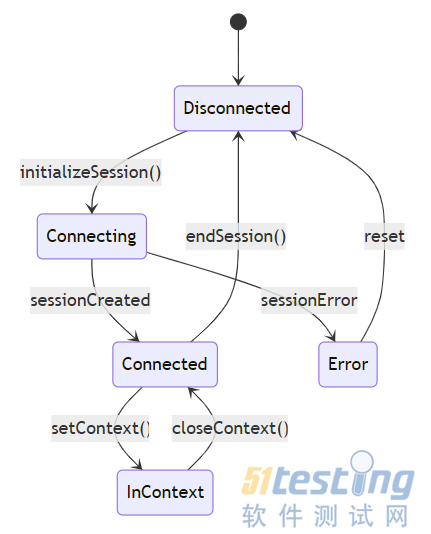
Appium会话管理采用状态模式处理移动端特有的会话生命周期:
5. 错误处理与诊断
移动端测试面临更多的不确定性,Nightwatch实现了完善的错误处理机制:
class MobileErrorHandler {
static handleAppiumError(error, desiredCapabilities) {
if (error.message.includes('session timed out')) {
return new IosSessionNotCreatedError({message: error.message}, desiredCapabilities);
}
if (error.message.includes('no devices online')) {
return new AndroidConnectionError({
message: error.message,
detailedErr: '检查设备连接状态',
extraDetail: '确保USB调试已开启'
});
}
return error;
}
}
6. 移动助手集成
Nightwatch通过@nightwatch/mobile-helper包提供移动端环境检测和配置验证:
function requireMobileHelper() {
try {
return require('@nightwatch/mobile-helper');
} catch (err) {
if (err.code === 'MODULE_NOT_FOUND') {
err.message = `@nightwatch/mobile-helper需要作为项目依赖安装`;
err.help = ['运行: npm i @nightwatch/mobile-helper'];
}
throw err;
}
}
移动助手提供以下核心功能:
·
Android环境验证(ANDROID_HOME、adb、emulator)
· iOS环境检测(Xcode、simctl、ideviceinfo)
· 设备列表获取和验证
· 环境变量配置指导
7. 平台特异性处理
架构中包含了完善的平台检测和处理逻辑:
function isAndroid(desiredCapabilities = {}) {
const {platformName} = desiredCapabilities;
if (platformName && platformName.toLowerCase() === 'android') {
return true;
}
// 检查Chrome/Firefox的Android包名
const options = desiredCapabilities['goog:chromeOptions'] ||
desiredCapabilities['moz:firefoxOptions'];
return !!(options && options.androidPackage);
}
function isIos(desiredCapabilities = {}) {
const {platformName} = desiredCapabilities;
return !!(platformName && platformName.toLowerCase() === 'ios');
}
这种深度集成架构使得Nightwatch.js能够:
·无缝支持Android和iOS平台测试
· 提供统一的API接口用于Web和移动端测试
· 自动处理移动端特有的配置和错误情况
· 提供丰富的移动端操作命令和断言
· 支持真机、模拟器和云测试平台的测试执行
通过这种架构设计,开发者和测试人员可以用相同的测试编写模式和API来处理Web应用和移动应用的自动化测试,大大降低了学习和使用成本。
iOS/Android原生应用测试配置
Nightwatch.js通过Appium集成提供了强大的移动端原生应用测试能力,支持iOS和Android平台的真机与模拟器测试。本文将详细介绍如何配置Nightwatch.js进行原生移动应用测试。
环境准备与依赖安装
在进行移动端测试前,需要确保系统环境配置正确:
# 安装必要的依赖
npm install nightwatch
npm install -g appium
npm install @nightwatch/mobile-helper
# 检查Android环境配置
npx @nightwatch/mobile-helper android
# 检查iOS环境配置
npx @nightwatch/mobile-helper ios
基础配置结构
Nightwatch.js的移动端测试配置主要通过nightwatch.conf.js文件进行设置。以下是一个完整的移动端测试配置示例:
module.exports = {
src_folders: ['tests/mobile'],
webdriver: {
start_process: true,
server_path: require('appium').main,
port: 4723,
cli_args: {}
},
test_settings: {
default: {
desiredCapabilities: {
automationName: 'Appium',
platformName: 'Android',
platformVersion: '13.0',
deviceName: 'Android Emulator',
app: './apps/myapp.apk',
appPackage: 'com.example.myapp',
appActivity: 'com.example.myapp.MainActivity',
newCommandTimeout: 300
}
},
ios_simulator: {
desiredCapabilities: {
automationName: 'XCUITest',
platformName: 'iOS',
platformVersion: '16.2',
deviceName: 'iPhone 14',
app: './apps/myapp.app',
autoAcceptAlerts: true,
usePrebuiltWDA: true
}
},
android_real: {
desiredCapabilities: {
automationName: 'UiAutomator2',
platformName: 'Android',
platformVersion: '13.0',
deviceName: 'Google Pixel 6',
udid: 'ABCDEF0123456789',
app: './apps/myapp.apk',
appPackage: 'com.example.myapp',
appActivity: 'com.example.myapp.MainActivity',
realMobile: true
}
}
}
};
平台特定配置详解
Android配置选项
Android平台支持多种自动化引擎和配置选项:
android_config: {
desiredCapabilities: {
automationName: 'UiAutomator2', // 或 'Espresso'
platformName: 'Android',
platformVersion: '13.0',
deviceName: 'Android Emulator',
// 应用相关配置
app: '/path/to/app.apk',
appPackage: 'com.company.app',
appActivity: 'com.company.app.MainActivity',
appWaitActivity: 'com.company.app.SplashActivity',
// 设备特性
avd: 'test_emulator', // AVD名称
avdArgs: '-no-snapshot-load', // AVM参数
gpsEnabled: true, // GPS启用
orientation: 'PORTRAIT', // 屏幕方向
// 测试选项
autoGrantPermissions: true, // 自动授权
noReset: false, // 不重置应用状态
fullReset: true, // 完全重置
disableWindowAnimation: true // 禁用动画
}
}
iOS配置选项
iOS平台配置针对真机和模拟器有不同的设置:
ios_config: {
desiredCapabilities: {
automationName: 'XCUITest',
platformName: 'iOS',
platformVersion: '16.2',
deviceName: 'iPhone 14',
// 应用配置
app: '/path/to/app.app',
bundleId: 'com.company.app',
// 真机特定配置
udid: '00008020-001A45C83445802E', // 设备UDID
xcodeOrgId: 'TEAM_ID', // 开发者团队ID
xcodeSigningId: 'iPhone Developer',
// 模拟器配置
'safari:useSimulator': true, // 使用模拟器
'safari:platformVersion': '16.2', // 模拟器版本
// 通用选项
autoAcceptAlerts: true, // 自动接受弹窗
autoDismissAlerts: true, // 自动关闭弹窗
connectHardwareKeyboard: true, // 连接硬件键盘
}
}
多环境配置管理
对于复杂的测试场景,建议使用环境变量来管理不同配置:
const environments = {
local: {
android: {
deviceName: 'Android Emulator',
platformVersion: '13.0',
avd: 'test_emulator'
},
ios: {
deviceName: 'iPhone 14 Simulator',
platformVersion: '16.2'
}
},
cloud: {
android: {
deviceName: 'Google Pixel 6',
platformVersion: '13.0',
realMobile: true
},
ios: {
deviceName: 'iPhone 14',
platformVersion: '16.2',
realMobile: true
}
}
};
function getConfig(env, platform) {
const baseConfig = {
automationName: platform === 'android' ? 'UiAutomator2' : 'XCUITest',
platformName: platform,
app: `./apps/myapp.${platform === 'android' ? 'apk' : 'app'}`,
newCommandTimeout: 300,
...environments[env][platform]
};
return baseConfig;
}
高级配置特性
自定义Appium参数
可以通过CLI参数自定义Appium服务器配置:
webdriver: {
start_process: true,
server_path: require('appium').main,
port: 4723,
cli_args: {
'--relaxed-security': true,
'--allow-insecure': 'adb_shell',
'--log-level': 'info:debug',
'--session-override': true,
'--default-capabilities': '{"platformName": "Android"}'
}
}
网络和代理配置
desiredCapabilities: {
// 网络配置
networkSpeed: 'full', // 网络速度模拟
disableNetwork: false, // 禁用网络
wifiOnly: false, // 仅WiFi
// 代理配置
proxy: {
proxyType: 'manual',
httpProxy: 'proxy.example.com:8080',
sslProxy: 'proxy.example.com:8080'
},
// DNS配置
dns: ['8.8.8.8', '8.8.4.4']
}
性能监控配置
desiredCapabilities: {
// 性能数据收集
enablePerformanceLogging: true,
performanceLoggingPrefs: {
enableNetwork: true,
enablePage: true,
enableTimeline: true
},
// 内存监控
memoryLogging: true,
cpuLogging: true,
// 电池状态
batteryInfo: true
}
配置验证和错误处理
Nightwatch.js提供了完善的配置验证机制:
const { isAndroid, isIos, isMobile } = require('nightwatch/lib/utils/mobile');
// 配置验证函数
function validateMobileConfig(capabilities) {
if (!isMobile(capabilities)) {
throw new Error('Invalid mobile configuration');
}
if (isAndroid(capabilities) && !capabilities.appPackage) {
throw new Error('Android apps require appPackage capability');
}
if (isIos(capabilities) && capabilities.realMobile && !capabilities.udid) {
throw new Error('Real iOS devices require UDID capability');
}
return true;
}
最佳实践配置示例
以下是一个生产环境推荐的最佳配置示例:
module.exports = {
src_folders: ['tests/mobile'],
webdriver: {
start_process: true,
server_path: require('appium').main,
port: 4723,
cli_args: {
'--relaxed-security': true,
'--log-level': 'info',
'--session-override': true
},
timeout_options: {
timeout: 120000,
retry_attempts: 2
}
},
globals: {
waitForConditionTimeout: 10000,
retryAssertionTimeout: 10000,
asyncHookTimeout: 30000
},
test_settings: {
android_emulator: {
desiredCapabilities: {
automationName: 'UiAutomator2',
platformName: 'Android',
platformVersion: '13.0',
deviceName: 'Android Emulator',
app: process.env.APP_PATH || './app/build/outputs/apk/debug/app-debug.apk',
appPackage: 'com.example.app',
appActivity: 'com.example.app.MainActivity',
autoGrantPermissions: true,
noReset: false,
fullReset: true,
newCommandTimeout: 300,
enablePerformanceLogging: true
}
}
}
};
通过以上配置,Nightwatch.js能够为iOS和Android原生应用测试提供完整的支持,包括真机测试、模拟器测试、性能监控等高级功能。合理的配置管理可以显著提高移动端测试的稳定性和效率。
移动端Web应用测试最佳实践
在移动端Web应用测试中,Nightwatch.js结合Appium提供了强大的测试能力。通过合理的测试策略和最佳实践,可以确保移动Web应用在各种设备和浏览器环境下都能正常工作。以下是一些关键的最佳实践:
响应式设计测试策略
移动端Web应用必须适应不同屏幕尺寸和设备特性。Nightwatch.js提供了多种方法来验证响应式设计:
// 测试不同屏幕尺寸下的布局
module.exports = {
'响应式布局测试': function(browser) {
browser
.url('https://example.com')
.setDeviceDimensions(375, 812) // iPhone X尺寸
.assert.visible('.mobile-menu', '移动端菜单应可见')
.setDeviceDimensions(1024, 768) // iPad尺寸
.assert.visible('.tablet-menu', '平板端菜单应可见')
.end();
}
};
触摸交互测试
移动设备的核心交互方式是触摸,测试时需要特别关注触摸事件的处理:
// 触摸交互测试示例
module.exports = {
'触摸滑动测试': function(browser) {
browser
.url('https://example.com/carousel')
.touchFlick(100, 100, -200, 0, 500) // 向左滑动
.assert.visible('.slide-2', '第二张幻灯片应可见')
.touchFlick(100, 100, 200, 0, 500) // 向右滑动
.assert.visible('.slide-1', '第一张幻灯片应可见')
.end();
}
};
网络条件模拟
移动设备经常面临不稳定的网络环境,测试时需要模拟各种网络条件:
// 网络条件模拟测试
module.exports = {
'弱网环境测试': function(browser) {
browser
.setNetworkConditions({
offline: false,
latency: 500, // 500ms延迟
download_throughput: 500 * 1024, //
javascript
本文内容不用于商业目的,如涉及知识产权问题,请权利人联系51Testing小编(021-64471599-8017),我们将立即处理