在移动应用开发过程中,跨平台兼容性测试、复杂手势操作验证以及
自动化测试脚本的稳定性一直是开发者面临的主要挑战。传统的手动测试不仅耗时耗力,而且难以保证测试的一致性和覆盖率。
Appium作为一款开源的移动应用自动化测试框架,支持iOS和
Android平台,而php-webdriver作为Selenium/WebDriver协议的PHP客户端,能够与Appium无缝集成,为PHP开发者提供强大的
移动端测试能力。本文将详细介绍如何利用php-webdriver与Appium协同工作,实现高效、稳定的移动端自动化测试。
读完本文后,您将能够:
·理解Appium与php-webdriver的工作原理及协同机制
· 配置Appium环境并创建基本的移动端测试脚本
· 掌握元素定位、手势操作、屏幕截图等核心测试技巧
· 解决移动端测试中常见的同步问题和稳定性挑战
· 构建完整的移动端测试自动化流程
Appium与php-webdriver协同工作原理
架构概述
Appium与php-webdriver的协同工作基于Client-Server架构,其核心组件包括:
· php-webdriver:作为客户端库,负责发送WebDriver协议命令到Appium Server
· Appium Server:接收客户端命令,转换为原生移动自动化指令
· 移动设备/模拟器:执行Appium Server发送的指令,运行被测应用
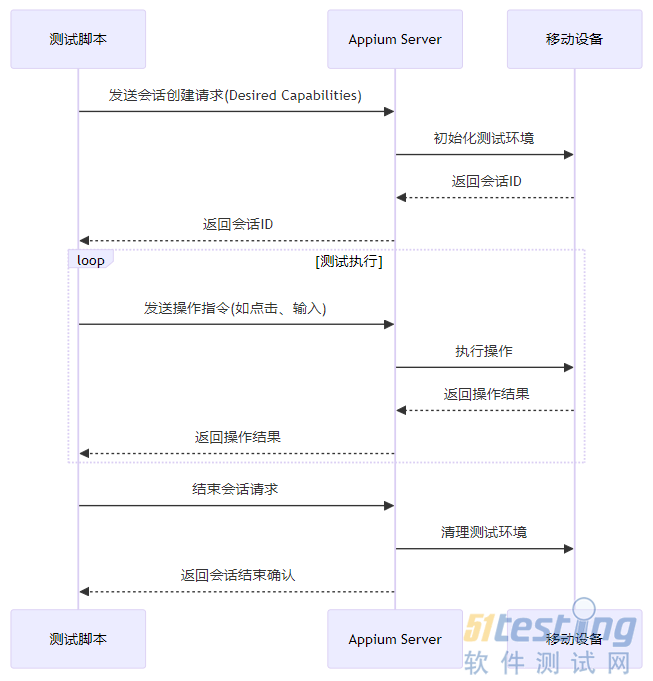
协议交互流程
Appium与php-webdriver之间通过Selenium/WebDriver协议进行通信,具体交互流程如下:
环境搭建与配置
系统要求
· PHP 7.1+
· Appium 1.15.0+
· Node.js 12+
· Android SDK (Android测试)
· Xcode (iOS测试)
· 模拟器或真实移动设备
安装步骤
安装php-webdriver
composer require php-webdriver/webdriver
安装Appium
安装必要的Appium驱动
# Android驱动
appium driver install uiautomator2
# iOS驱动
appium driver install xcuitest
启动Appium Server
appium --address 127.0.0.1 --port 4723
第一个移动端测试脚本
创建Desired Capabilities
Desired Capabilities是一组键值对,用于告诉Appium Server测试的目标平台、设备信息和应用信息。在php-webdriver中,可以通过DesiredCapabilities类来设置:
use Facebook\WebDriver\Remote\DesiredCapabilities;
// Android应用测试配置
$capabilities = DesiredCapabilities::android();
$capabilities->setCapability('platformName', 'Android');
$capabilities->setCapability('platformVersion', '10');
$capabilities->setCapability('deviceName', 'Android Emulator');
$capabilities->setCapability('appPackage', 'com.example.myapp');
$capabilities->setCapability('appActivity', '.MainActivity');
$capabilities->setCapability('automationName', 'UiAutomator2');
初始化远程WebDriver
use Facebook\WebDriver\Remote\RemoteWebDriver;
// 连接到Appium Server
$driver = RemoteWebDriver::create(
'http://127.0.0.1:4723/wd/hub',
$capabilities
);
基本操作示例
// 查找元素并点击
$driver->findElement(WebDriverBy::id('com.example.myapp:id/button_login'))->click();
// 输入文本
$driver->findElement(WebDriverBy::id('com.example.myapp:id/edittext_username'))
->sendKeys('testuser');
$driver->findElement(WebDriverBy::id('com.example.myapp:id/edittext_password'))
->sendKeys('testpassword');
// 提交表单
$driver->findElement(WebDriverBy::id('com.example.myapp:id/button_submit'))->click();
// 验证登录成功
$welcomeMessage = $driver->findElement(WebDriverBy::id('com.example.myapp:id/textview_welcome'))->getText();
assert($welcomeMessage === 'Welcome, testuser!');
// 退出会话
$driver->quit();
核心测试功能实现
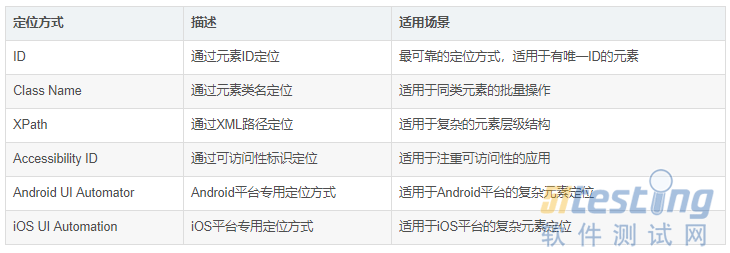
元素定位策略
移动端应用元素定位与
Web应用有所不同,常用的定位策略包括:
示例代码:
use Facebook\WebDriver\WebDriverBy;
// ID定位
$element = $driver->findElement(WebDriverBy::id('com.example.myapp:id/button_login'));
// XPath定位
$element = $driver->findElement(WebDriverBy::xpath('//android.widget.Button[@text="登录"]'));
// Accessibility ID定位
$element = $driver->findElement(WebDriverBy::accessibilityId('loginButton'));
// Android UI Automator定位
$element = $driver->findElement(WebDriverBy::androidUIAutomator('new UiSelector().text("登录")'));
// iOS UI Automation定位
$element = $driver->findElement(WebDriverBy::iosUIAutomation('.elements().withName("登录")'));
手势操作
移动端应用测试中常用的手势操作包括点击、长按、滑动、缩放等,php-webdriver提供了WebDriverTouchActions类来实现这些操作:
use Facebook\WebDriver\Interactions\WebDriverTouchActions;
// 点击操作
$element = $driver->findElement(WebDriverBy::id('com.example.myapp:id/button_login'));
(new WebDriverTouchActions($driver))->singleTap($element)->perform();
// 长按操作
$element = $driver->findElement(WebDriverBy::id('com.example.myapp:id/item_context_menu'));
(new WebDriverTouchActions($driver))->longPress($element)->perform();
// 滑动操作
$element = $driver->findElement(WebDriverBy::id('com.example.myapp:id/listview_items'));
(new WebDriverTouchActions($driver))
->press($element)
->waitAction(200)
->moveToElement($element, 0, -300)
->release()
->perform();
// 多点触控缩放操作
$element = $driver->findElement(WebDriverBy::id('com.example.myapp:id/image_photo'));
$actions = new WebDriverTouchActions($driver);
$actions->pinch($element); // 缩小
$actions->zoom($element); // 放大
$actions->perform();
屏幕截图与录屏
在测试失败时,屏幕截图是定位问题的重要手段:
// 截取当前屏幕
$screenshot = $driver->takeScreenshot();
file_put_contents('screenshot_' . date('YmdHis') . '.png', base64_decode($screenshot));
// 启动录屏
$driver->startRecordingScreen();
// ... 执行测试步骤 ...
// 停止录屏并保存
$video = $driver->stopRecordingScreen();
file_put_contents('recording_' . date('YmdHis') . '.mp4', base64_decode($video));
处理弹窗与通知
移动端应用中常见的弹窗和通知可以通过以下方式处理:
use Facebook\WebDriver\WebDriverAlert;
// 处理系统弹窗
$alert = $driver->switchTo()->alert();
$alertText = $alert->getText();
$alert->accept(); // 接受弹窗
// $alert->dismiss(); // 取消弹窗
// 处理通知栏
// 打开通知栏
$driver->openNotifications();
// 操作通知
$notification = $driver->findElement(WebDriverBy::xpath('//android.widget.TextView[@text="新消息通知"]'));
$notification->click();
测试同步与稳定性优化
显式等待与隐式等待
移动端应用由于加载速度和响应时间的不确定性,需要使用等待机制来确保测试稳定性:
use Facebook\WebDriver\WebDriverWait;
use Facebook\WebDriver\WebDriverExpectedCondition;
// 设置隐式等待
$driver->manage()->timeouts()->implicitlyWait(10);
// 设置显式等待
$wait = new WebDriverWait($driver, 15);
$element = $wait->until(
WebDriverExpectedCondition::visibilityOfElementLocated(
WebDriverBy::id('com.example.myapp:id/button_submit')
)
);
$element->click();
// 自定义等待条件
$wait->until(function ($driver) {
$elements = $driver->findElements(WebDriverBy::className('android.widget.ListView'));
return count($elements) > 0;
});
常见同步问题解决方案
// 等待元素可点击
$wait->until(
WebDriverExpectedCondition::elementToBeClickable(
WebDriverBy::id('com.example.myapp:id/button_submit')
)
)->click();
// 等待页面标题变化
$wait->until(
WebDriverExpectedCondition::titleContains('首页')
);
// 等待加载指示器消失
$wait->until(
WebDriverExpectedCondition::invisibilityOfElementLocated(
WebDriverBy::id('com.example.myapp:id/progress_loading')
)
);
测试框架集成
PHPUnit集成
将php-webdriver测试脚本集成到PHPUnit测试框架:
use Facebook\WebDriver\Remote\RemoteWebDriver;
use Facebook\WebDriver\Remote\DesiredCapabilities;
use PHPUnit\Framework\TestCase;
class MobileAppTest extends TestCase
{
/** @var RemoteWebDriver */
private $driver;
protected function setUp(): void
{
// 初始化Appium连接
$capabilities = DesiredCapabilities::android();
$capabilities->setCapability('platformName', 'Android');
$capabilities->setCapability('platformVersion', '10');
$capabilities->setCapability('deviceName', 'Android Emulator');
$capabilities->setCapability('appPackage', 'com.example.myapp');
$capabilities->setCapability('appActivity', '.MainActivity');
$capabilities->setCapability('automationName', 'UiAutomator2');
$this->driver = RemoteWebDriver::create(
'http://127.0.0.1:4723/wd/hub',
$capabilities
);
}
public function testLoginSuccess()
{
// 登录测试步骤
$this->driver->findElement(WebDriverBy::id('com.example.myapp:id/edittext_username'))
->sendKeys('testuser');
$this->driver->findElement(WebDriverBy::id('com.example.myapp:id/edittext_password'))
->sendKeys('testpassword');
$this->driver->findElement(WebDriverBy::id('com.example.myapp:id/button_submit'))
->click();
// 验证登录成功
$welcomeMessage = $this->driver->findElement(WebDriverBy::id('com.example.myapp:id/textview_welcome'))
->getText();
$this->assertEquals('Welcome, testuser!', $welcomeMessage);
}
protected function tearDown(): void
{
// 确保会话关闭,即使测试失败
if ($this->driver) {
// 测试失败时截图
if (!$this->getStatus()) {
$screenshot = $this->driver->takeScreenshot();
file_put_contents(
'failure_screenshot_' . $this->getName() . '_' . date('YmdHis') . '.png',
base64_decode($screenshot)
);
}
$this->driver->quit();
}
}
}
持续集成配置
将移动端测试集成到CI/CD流程中,以Jenkins为例:
pipeline {
agent any
stages {
stage('Build') {
steps {
sh 'composer install'
}
}
stage('Start Appium') {
steps {
sh 'appium --address 127.0.0.1 --port 4723 &'
sh 'sleep 10' // 等待Appium启动
}
}
stage('Run Mobile Tests') {
steps {
sh 'vendor/bin/phpunit tests/MobileAppTest.php'
}
post {
always {
junit 'build/logs/junit.xml'
archiveArtifacts artifacts: '*.png,*.mp4', fingerprint: true
}
}
}
}
post {
always {
sh 'pkill -f appium' // 停止Appium服务
}
}
}
高级应用与最佳实践
测试数据管理
为提高测试的可维护性和可扩展性,建议将测试数据与测试脚本分离:
// 测试数据类
class TestDataProvider {
public static function getLoginCredentials() {
return [
'valid_user' => [
'username' => 'testuser',
'password' => 'testpassword',
'expected_message' => 'Welcome, testuser!'
],
'invalid_user' => [
'username' => 'invaliduser',
'password' => 'invalidpassword',
'expected_message' => 'Invalid username or password'
]
];
}
}
// 数据驱动测试
/**
* @dataProvider loginCredentialsProvider
*/
public function testLogin($username, $password, $expectedMessage) {
$this->driver->findElement(WebDriverBy::id('com.example.myapp:id/edittext_username'))
->sendKeys($username);
$this->driver->findElement(WebDriverBy::id('com.example.myapp:id/edittext_password'))
->sendKeys($password);
$this->driver->findElement(WebDriverBy::id('com.example.myapp:id/button_submit'))
->click();
$message = $this->driver->findElement(WebDriverBy::id('com.example.myapp:id/textview_message'))->getText();
$this->assertEquals($expectedMessage, $message);
}
public function loginCredentialsProvider() {
return TestDataProvider::getLoginCredentials();
}
测试报告生成
使用Allure等测试报告工具生成详细的测试报告:
use Facebook\WebDriver\Remote\RemoteWebDriver;
use Yandex\Allure\Adapter\Annotation\Features;
use Yandex\Allure\Adapter\Annotation\Stories;
use Yandex\Allure\Adapter\Annotation\Title;
use Yandex\Allure\Adapter\Annotation\Description;
use Yandex\Allure\Adapter\Annotation\Severity;
use Yandex\Allure\Adapter\Model\SeverityLevel;
/**
* @Features("用户认证")
* @Stories("登录功能")
*/
class LoginTest extends TestCase {
/**
* @Title("使用有效凭据登录")
* @Description("验证用户使用正确的用户名和密码能够成功登录")
* @Severity(level=SeverityLevel::CRITICAL)
*/
public function testValidLogin() {
// 测试步骤...
// 添加测试报告附件
$screenshot = $this->driver->takeScreenshot();
file_put_contents('login_success.png', base64_decode($screenshot));
$this->attachFile('登录成功截图', 'login_success.png');
}
}
结合php-webdriver和Appium进行简单的性能测试:
// 记录操作响应时间
$startTime = microtime(true);
// 执行操作
$driver->findElement(WebDriverBy::id('com.example.myapp:id/button_submit'))->click();
// 等待结果
$wait->until(
WebDriverExpectedCondition::visibilityOfElementLocated(
WebDriverBy::id('com.example.myapp:id/textview_welcome')
)
);
$endTime = microtime(true);
$responseTime = $endTime - $startTime;
// 验证性能指标
$this->assertLessThan(3, $responseTime, '操作响应时间超过3秒');
// 记录性能数据
file_put_contents(
'performance_data.csv',
date('Y-m-d H:i:s') . ',' . $responseTime . "\n",
FILE_APPEND
);
常见问题与解决方案
问题1:元素定位不稳定
原因:
·应用UI频繁变化
· 元素加载延迟
· 动态生成的元素ID
解决方案:
· 使用相对稳定的定位策略(如Accessibility ID)
· 结合显式等待和自定义等待条件
· 使用页面工厂模式封装元素定位
// 页面工厂模式示例
class LoginPage {
private $driver;
private $wait;
public function __construct(RemoteWebDriver $driver) {
$this->driver = $driver;
$this->wait = new WebDriverWait($driver, 15);
}
public function getUsernameField() {
return $this->wait->until(
WebDriverExpectedCondition::visibilityOfElementLocated(
WebDriverBy::id('com.example.myapp:id/edittext_username')
)
);
}
public function getPasswordField() {
return $this->wait->until(
WebDriverExpectedCondition::visibilityOfElementLocated(
WebDriverBy::id('com.example.myapp:id/edittext_password')
)
);
}
public function getSubmitButton() {
return $this->wait->until(
WebDriverExpectedCondition::elementToBeClickable(
WebDriverBy::id('com.example.myapp:id/button_submit')
)
);
}
public function login($username, $password) {
$this->getUsernameField()->sendKeys($username);
$this->getPasswordField()->sendKeys($password);
$this->getSubmitButton()->click();
return new HomePage($this->driver);
}
}
// 使用页面模型
$loginPage = new LoginPage($driver);
$homePage = $loginPage->login('testuser', 'testpassword');
问题2:测试脚本执行速度慢
原因:
·频繁的元素查找操作
· 不必要的等待时间
· 未优化的测试步骤顺序
解决方案:
· 减少重复的元素查找
· 优化等待时间,避免固定延迟
// 优化前
$driver->findElement(WebDriverBy::id('username'))->sendKeys('testuser');
$driver->findElement(WebDriverBy::id('password'))->sendKeys('testpassword');
$driver->findElement(WebDriverBy::id('submit'))->click();
// 优化后
$usernameField = $driver->findElement(WebDriverBy::id('username'));
$passwordField = $driver->findElement(WebDriverBy::id('password'));
$submitButton = $driver->findElement(WebDriverBy::id('submit'));
$usernameField->sendKeys('testuser');
$passwordField->sendKeys('testpassword');
$submitButton->click();
问题3:跨平台兼容性问题
原因:
·iOS和Android平台控件差异
· 平台特定的交互行为
· 不同版本系统的行为差异
解决方案:
· 使用条件逻辑处理平台差异
· 封装平台特定的操作方法
· 在不同平台上分别执行测试
// 处理平台差异
$platformName = $driver->getCapabilities()->getCapability('platformName');
if ($platformName === 'Android') {
$element = $driver->findElement(WebDriverBy::id('com.example.myapp:id/button_login'));
} else if ($platformName === 'iOS') {
$element = $driver->findElement(WebDriverBy::id('button_login'));
}
$element->click();
// 封装平台特定操作
class PlatformHelper {
public static function getLoginButton($driver) {
$platformName = $driver->getCapabilities()->getCapability('platformName');
if ($platformName === 'Android') {
return $driver->findElement(WebDriverBy::id('com.example.myapp:id/button_login'));
} else if ($platformName === 'iOS') {
return $driver->findElement(WebDriverBy::id('button_login'));
}
throw new Exception("Unsupported platform: $platformName");
}
}
// 使用平台帮助类
PlatformHelper::getLoginButton($driver)->click();
总结与展望
本文详细介绍了如何利用php-webdriver与Appium进行移动端测试,包括环境搭建、核心功能实现、稳定性优化和最佳实践等方面。通过Appium与php-webdriver的协同工作,PHP开发者可以构建强大、稳定的移动端测试自动化框架,有效提高移动应用的质量和开发效率。
未来,随着移动应用技术的不断发展,移动端测试将面临更多新的挑战和机遇,如跨平台应用测试、AR/VR应用测试等。php-webdriver和Appium社区也在不断发展,提供更多新功能和更好的性能支持。建议开发者持续关注社区动态,及时更新测试工具和技术,以应对不断变化的测试需求。
最后,移动端测试自动化是一个持续改进的过程,需要结合具体项目需求,不断优化测试策略和实践,才能构建真正高效、可靠的测试体系。
本文内容不用于商业目的,如涉及知识产权问题,请权利人联系51Testing小编(021-64471599-8017),我们将立即处理